v1.1.0 · MIT · 0 dependencies
any site in,
clean dataset out.
Crawl any site in your browser. silk reads robots.txt, fetches up to 25 pages, strips the nav and footers, chunks the text for RAG and lets you ask it questions. Take the JSONL with you.
Pages click a page for its clean text
What you get, straight from silk's own crawler:
- One clean record per page: title, headings, markdown-style text.
- Heading-aware chunks of up to 512 tokens, ready for RAG.
- A BM25 index in your browser to ask questions, with sources.
Ask this site BM25, runs in your browser
Token counts are estimates (words x 1.33). Answers are extracted sentences, not generated.
the same pipeline on your machine
The site caps a crawl at 25 pages. On your machine there is no cap: silk crawls at the pace the site asks for and writes one JSONL line per page. Then chunk it, index it and ask it questions from the terminal, a local dashboard or your agent over MCP.
$npx silk-crawl docs.example.com$ silk http://127.0.0.1:4173 --sitemap auto --delay 0 sitemap /sitemap_index.xml (5 URLs queued) saved / (38 words) skip /private/keys (robots) saved /docs/ (46 words) ... Done in 0.15s pages 12, words 252, est. tokens 334 $ silk chunk docs.jsonl && silk index chunks.jsonl Chunked 12 pages into 17 chunks (avg 20 tokens, max 51) Indexed 17 chunks, 120 terms (avg 14.5 terms per chunk) $ silk ask "how do I disable retries?" --k 2 Answer (extractive) Pass retries: 0 to fail fast. Network calls made by the loader are retried automatically when they fail with a timeout or a 5xx status. Sources [1] 5.92 Retries > Disable retries [2] 2.75 Retries
the whole pipeline in one package
Every stage writes a plain file you can open: JSONL in, JSONL out, one JSON index. Node 18 or newer is all you need.
Polite by default
robots.txt per RFC 9309 with Crawl-delay, per-host spacing, noindex, nofollow and canonical links. No flags needed.
Sitemap seeding
--sitemap auto reads robots.txt Sitemap: lines or /sitemap.xml, follows sitemap indexes and gzip files.
Resume
--resume reads the JSONL you already have, skips every URL and text hash in it and appends the rest. Kill it, run it again.
Clean text
Nav, footers, scripts and asides get dropped. Headings, lists and fenced code blocks stay as markdown.
Chunks for RAG
512 token chunks by default, split on headings first, then paragraphs, with 64 tokens of overlap. Each chunk keeps its URL and heading path.
Local search
A BM25 index in one JSON file plus an extractive answer. No model, no network. Add --llm for a cited answer from Anthropic or OpenAI.
Exports
Clean JSONL, a folder of Markdown files with front matter, or a Hugging Face dataset folder with a generated card.
MCP server
silk mcp gives your agent 4 tools: crawl, chunk, search and stats, over stdio.
Dashboard
silk ui starts a crawl from the browser, shows pages as they land and answers questions over the index.
crawl, chunk, index, ask
Four commands, four files. Run them one by one, or let the dashboard and the MCP server chain them for you.
Crawl
One JSONL record per page.
silk docs.example.com --sitemap auto
Chunk
Heading-aware chunks with overlap.
silk chunk dataset.jsonl --size 512 --overlap 64
Index
BM25 inverted index in one file.
silk index chunks.jsonl
Ask
Ranked passages and a short answer.
silk ask "how do I configure retries?"
give your agent a crawler
Add silk to Claude Desktop, Claude Code or Cursor. JSON-RPC over stdio, crawls capped at 200 pages per call.
{
  "mcpServers": {
    "silk": {
      "command": "npx",
      "args": ["-y", "silk-crawl", "mcp"]
    }
  }
}
- crawl_siteCrawl a site politely and return the page text, or write it to a JSONL file.
- chunk_datasetCut a dataset into retrieval chunks and optionally build the BM25 index.
- search_indexRanked passages with URL and heading path, plus a short extractive answer.
- dataset_statsPages, words, tokens, top domains, average length and duplicate rate.
a dashboard for the loop
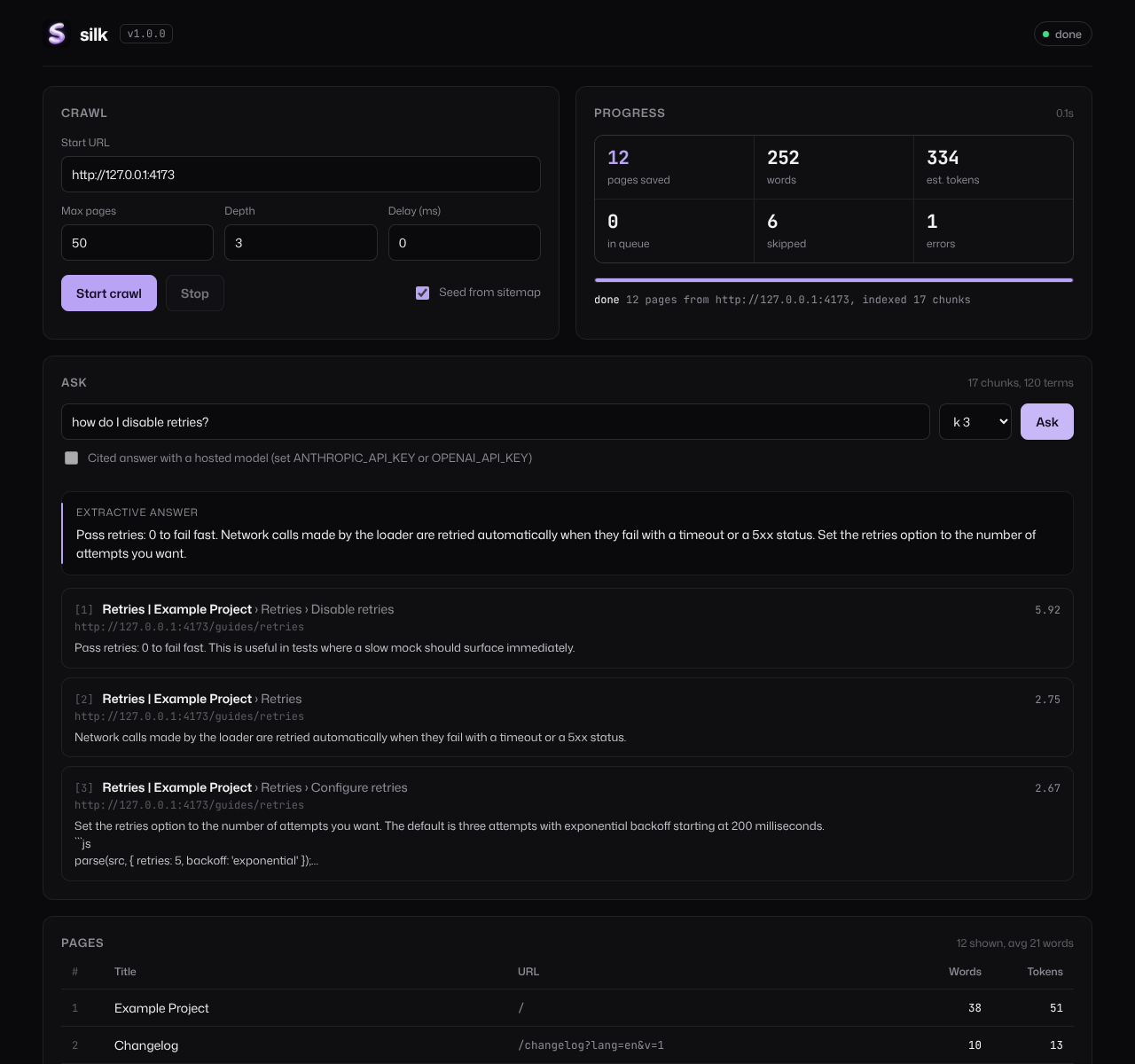
silk ui serves one local page on 127.0.0.1. Start a crawl, watch it fill, ask the index. Example data from the fixture site.
faq
What happens when I crawl on this site?
A serverless function runs silk's own crawler on the address you typed: robots.txt first, then up to 25 pages from the same site within 45 seconds. Pages stream back to your browser. Nothing is stored, and the search runs in your tab.
Why did a site come back empty?
Some sites block cloud servers, some build their text with JavaScript, some ask crawlers to stay out. The page tells you which. For anything bigger, run npx silk-crawl on your machine.
Does it run JavaScript?
No. silk reads the HTML the server sends. Docs sites, blogs and whitepapers usually render on the server. Single-page apps that build their text in the browser come out thin.
How are tokens counted?
Estimated as words times 1.33. Close for English prose with common tokenizers, and it keeps silk at zero dependencies. Chunk sizes use the same estimate.
Is the search semantic?
No, it is lexical: BM25 with stopwords and light stemming. No model, no GPU, no network. For semantic retrieval, feed chunks.jsonl to your embedding pipeline.
What leaves my machine with --llm?
The question and the top passages, sent to the provider whose key is set. Without --llm the only traffic is the crawl itself.
Can I crawl any site?
silk follows robots.txt and rate limits, but it can't read terms of service. Check a site's terms and the license of its content before you crawl it or publish a dataset.
What is $SILK?
The project's community token. The tool is MIT licensed and works the same with or without it. Nothing in silk needs a wallet. Not financial advice.